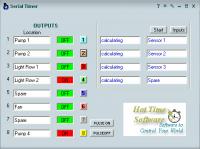
Use Serial timer to easily communicate with external appliances on an RS232 connection. Serial timer has powerful features similar to the timer software that Work with all types of serial ports.
Use Serial timer to easily communicate with external appliances on an RS232 connection. Serial timer has powerful features similar to the timer software that Work with all types of serial ports, including USB adaptors, Wireless Device Servers or any virtual port. This program is especially made to communicate with the k108, 108 and k108 multi drop relay boards via serial connection. The program consists of 11 forms. A main form, 8 output forms, 1 input form and an settings form. The main form gives the status of all 8 outputs and 4 inputs. The location of each output and input can be altered on this form. Each output form can be selected by the push-buttons marked 1 to 8 or the inputs can be selected by the push-button Inputs. The main form can be minimized so that the user can do other tasks, and the timing program will still run in the background. All output forms can be in ON, OFF or AUTO modes. When in AUTO the output will be on or off depending on the times selected. Only output 7 will work over the midnight period e.g. 11pm Friday to 2am Saturday, by selecting start and finish days. Output 8 can have up to 10 switching times within the 24hr period from 00:00:00 to 23:59:59. All outputs have an additional pulse timer from 1 second to 24 hours (set in minutes), on or off. The pulse will work regardless of the mode the form is in, ON, OFF or AUTO. The Inputs form can have up to 4 inputs. Inputs 1 & 2 can turn on or off outputs, if outputs are in AUTO mode. Input 3 can turn on or off outputs for a set time, if the outputs are in AUTO mode. Inputs 4 can play a selected sound (.wave file) in windows\media and c:\timer. Requirements: Win XP Operating system: Win2000,Win7 x32,WinVista,WinXP Release notes: Minor Update
ShixxNOTE 6.net is a personal organizer, desktop sticky notes (post-it) program, instant messaging application (LAN messenger) and a communications tool used across a local network, Internet and via email. Perfect and ideal tool for LAN communication
Price: $50.00, Rating: 9.5, Downloads: 110 Download
Blog Navigator is a fast and easy-to-use program for browsing blog sites. It also includes features for reading blogs offline, as well as putting different blog sites together to create your own customized browsing preferences.
Price: $0.00, Rating: 7, Downloads: 100 Download
ParmisPDF is a perfect PDF tool with the ability to perform wide range of operations on PDF documents, comprising a user-friendly interface ideal for users of any skill level. This application is useful for businesses and organizations in any scale
Price: $39.95, Rating: 9, Downloads: 88 Download
User Rating
Rating:2.2 out of
5 Based on13 ratings.
13 user reviews.

 Serial Timer 3.2.0.6 details